
The 2026 MacBook Reset: From the Budget “Neo” to the AI-Crushing M5 Pro
I vividly remember the exact afternoon I realized how much the laptop landscape had shifted.
I spend a borderline unhealthy amount of time analyzing CPU benchmarks, stressing over unified memory bandwidth, and debating whether a specific machine is a “pro-grade” tool or just a fancy internet browser. For years, the MacBook lineup felt like a confusing middle ground—the M-series chips were brilliant, but the tiers were blurring. You weren’t sure if you needed an Air, a Pro, or if you were just paying extra for a fan and a heavier chassis.
Well, if you’ve been waiting for a reason to upgrade, 2026 is the year. Apple just dropped one of the most decisive lineups in recent memory, finally drawing hard lines between “I need a computer that just works” and “I’m training AI models at 3:00 AM.”
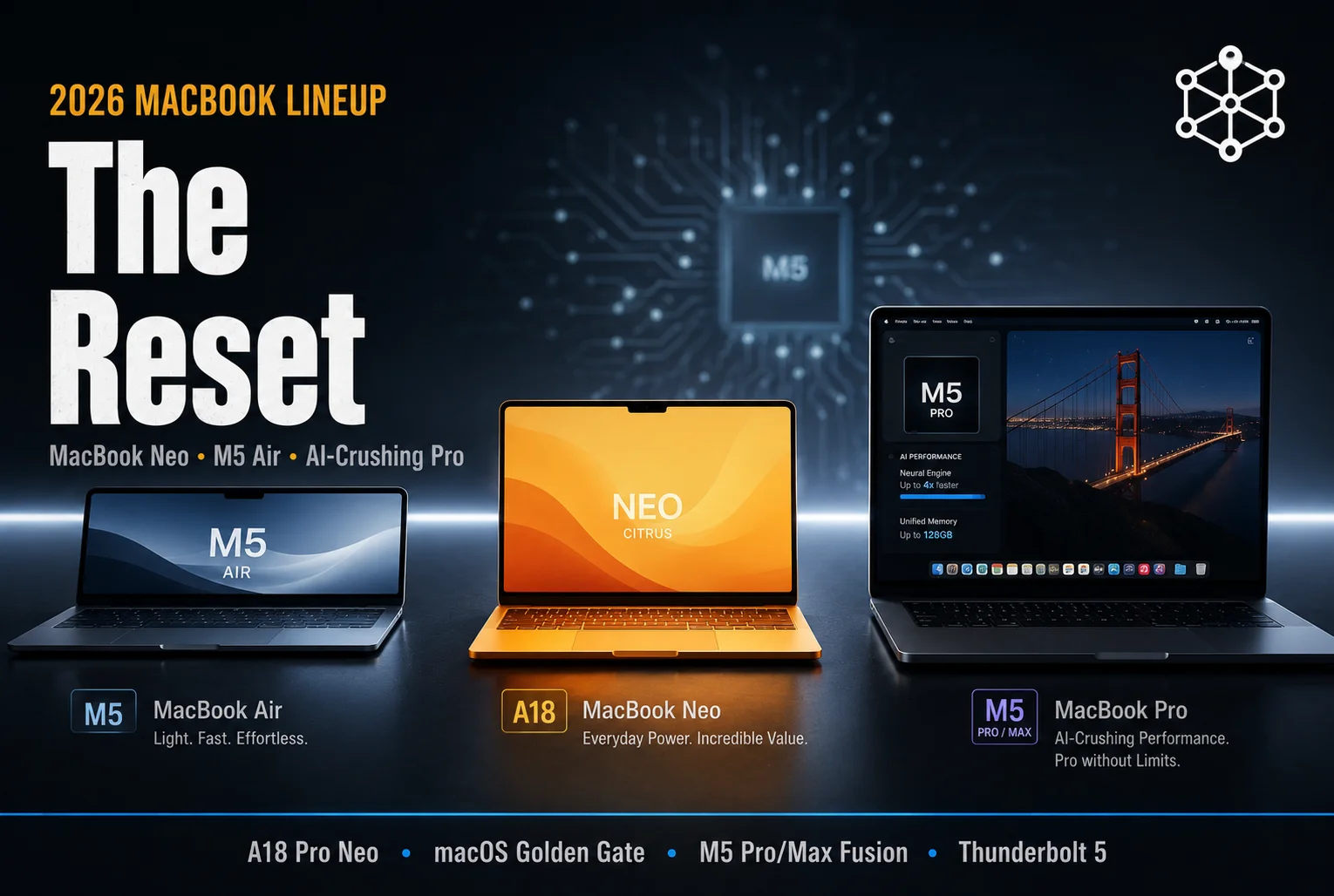
Let’s be completely real: Apple’s 2026 refresh isn’t just about faster chips. It’s about segmenting the market. We have the brand-new, ultra-budget MacBook Neo, the classic-yet-evolved M5 MacBook Air, and the absolute monster M5 Pro/Max MacBook Pro lineup. They finally stopped playing games with the hardware and gave everyone a clear lane.
If you’ve been feeling overwhelmed by the “M-chip” alphabet soup, I’ve got you. This is your no-nonsense, deeply human guide to navigating the 2026 MacBook ecosystem. No PR spin, no marketing fluff—just the specs that actually matter for your daily workflow.
Part 1: The New Hierarchy (Where Do You Fit In?)
Apple’s 2026 strategy is simple: they want to catch you at every price point.
1. The MacBook Neo: The “Why Did They Wait So Long?” Option
For years, people begged Apple for a “cheap” laptop. They finally gave it to us, and it’s called the MacBook Neo. It runs on the A18 Pro chip—yes, the same one found in the iPhone.
- The Vibe: It’s thin, it’s light, and it’s essentially a high-end Chromebook killer. It’s not meant for video editing or coding complex apps; it’s for the student, the writer, and the person who just wants a rock-solid machine to handle emails, Netflix, and web research.
- The Price: Starting at $599, it’s the most affordable entry point to macOS in history.
2. The M5 MacBook Air: The “Goldilocks” Machine
The Air remains the default answer to “What laptop should I buy?” for 95% of people. The new M5 chip adds a dedicated Neural Accelerator to every GPU core, meaning this thing is officially an AI-processing machine in a fanless, silent body.
- The Vibe: It’s still the best balance of portability and power. With 16GB of base RAM (finally!) and double the base storage (512GB), it’s no longer a “compromise” computer.
- The Price: Starting at $1,099.
3. The M5 Pro/Max MacBook Pro: The “Desktop-Killer”
If you’re a professional—and I mean someone whose time is measured in render speeds—this is your machine. The new M5 Pro and M5 Max chips don’t just feature more cores; they’re built on a “Fusion Architecture” that’s specifically designed to handle on-device AI tasks without needing to hit the cloud.
- The Vibe: If the Air is a daily driver, the Pro is a workhorse. With speeds up to 4x faster at AI prompts than previous generations and support for Thunderbolt 5, this is for those working in 8K video, massive codebases, or complex 3D datasets.
Part 2: The “M5” Performance Leap
If you’re coming from an M1 or M2, the jump to the M5 isn’t just an “incremental update”—it’s a completely different experience.
The biggest news for 2026 is the Neural Accelerator integrated into each GPU core. Before now, AI-heavy tasks were often relegated to the Neural Engine (a separate part of the chip). By spreading the AI heavy lifting across the entire GPU, the M5 series delivers up to 4x better AI performance than the M4, and a whopping 9.5x jump compared to the original M1.
Whether you’re using the new “Siri AI” in macOS Golden Gate to summarize 50-page PDFs or using local image generation tools, the M5 handles it without even spinning up a fan (on the Air) or heating up your lap.
Part 3: macOS Golden Gate (The AI Shift)
Alongside the hardware, Apple launched macOS 27 (Golden Gate). This is a big one. It’s the first version of macOS to run exclusively on Apple Silicon, finally closing the door on the Intel era.
If you’re still rocking an Intel-based MacBook, Golden Gate is effectively the end of the line for your OS support. The new OS is built entirely around “Siri AI.” It’s not just a voice command anymore; it’s an integrated system that can scan your Mail, your Notes, and your recent Files to pull data instantly. The integration is so tight that it feels less like using an operating system and more like having a personal research assistant that lives inside your menu bar.
Final Thoughts: Should You Buy Now?
The 2026 lineup is a “no-regrets” refresh.
- If you’re on an Intel Mac: Your time is up. Golden Gate won’t run on your hardware, and you’re missing out on the efficiency gains that make these M5 machines last 24 hours on a single charge.
- If you’re on an M1/M2: You’ll notice a massive difference in AI capability. If your workflow involves LLMs, photo enhancement, or heavy multitasking, the M5’s unified memory bandwidth (now 153GB/s on the Air) will feel like a brand-new world.
- The “Neo” factor: If you just need a laptop for school or casual use, the Neo is a massive disruptor. It’s the first time you don’t have to “stretch” your budget to get into the Apple ecosystem.
The MacBook lineup in 2026 is finally logical. Neo for the budget-conscious, Air for the mainstream, and Pro for the heavy hitters. Pick your lane, and you’re going to be set for the next four or five years.
Frequently Asked Questions (FAQs)
Q: Is the MacBook Neo powerful enough for serious work?
A: No. The Neo uses an A-series chip (A18 Pro). While it’s great for web browsing, writing, and casual media consumption, it isn’t designed for sustained “Pro” workflows like video editing or software development. Stick to the Air or Pro for that.
Q: Does the 2026 MacBook Pro really last 24 hours on battery?
A: According to Apple’s tests, yes—under specific “light” usage conditions (like local video playback). In real-world “Pro” usage (like 4K rendering or compiling code), you’ll see significantly less, but it’s still easily the longest-lasting pro laptop in the industry.
Q: What is “Thunderbolt 5” and do I need it?
A: Thunderbolt 5 offers double the bandwidth of Thunderbolt 4. If you aren’t plugging in multiple 8K displays or massive high-speed external RAID storage arrays, you likely won’t notice the difference. It’s a “pro-only” feature for a reason.
Q: Can I still run Windows on the 2026 MacBook lineup?
A: Not natively. With the removal of Boot Camp and the exclusive move to Apple Silicon, your only options for Windows are virtualization tools like Parallels Desktop, which run very well on M5 chips.
Q: Should I wait for the M6?
A: With the M5 lineup just launching in March 2026, you’re looking at a standard 12-to-18-month cycle. If you need a computer now, the M5 series is at the very beginning of its life cycle, making it the perfect time to buy.





Leave a Reply