

Is Claude Down? How to Check Claude AI Status and Fix Common Issues (2026)
You opened your browser, typed your prompt, hit enter — and nothing happened. Just a spinning wheel staring back at you or a vague error message that tells you absolutely nothing useful. Maybe you refreshed three times, maybe you closed the tab and reopened it, maybe you did that thing where you just stare at the screen willing it to work. And then you ended up here, googling “is Claude down” at the worst possible moment.
Honestly, we have all been there. It is one of the most frustrating experiences in modern work life — you are mid-project, mid-thought, or mid-deadline and the tool you rely on just stops working without explanation.
The good news is that the vast majority of the time when Claude appears to be down it either is not actually down at all, or the issue resolves itself within minutes. The real skill is knowing which situation you are dealing with so you stop wasting time barking up the wrong tree. That is exactly what this guide is for — a straightforward honest walkthrough from checking real server status to fixing things on your own device to knowing what to reach for if Claude genuinely is offline.
What “Claude Down” Actually Means
Here is something that trips people up: not all Claude problems are the same thing and lumping them together as “Claude is down” leads to a lot of wasted time trying the wrong fixes.
There are actually several distinct situations that all produce the same frustrating result of Claude not working.
A full outage means Claude’s servers are completely offline for every user globally. This is genuinely rare. Anthropic’s infrastructure is robust and full outages are short-lived when they do happen. When a full outage occurs Anthropic typically acknowledges it publicly within minutes and posts updates throughout.
A partial outage means some features or some users are affected while others work normally. The web chat interface might be broken while the API runs fine. File uploads might fail while basic text conversations work perfectly. Partial outages are more common than full ones and significantly harder to diagnose because Claude appears to be working but isn’t working for you specifically.
Degraded performance means Claude is technically online but running slowly, timing out on longer prompts, delivering incomplete responses, or cutting off mid-sentence. This is by far the most common experience people describe as “Claude is down” and it almost always resolves on its own within thirty to sixty minutes as server load normalizes.
A problem on your end is honestly the explanation more often than most people expect or want to admit. Browser cache corruption, VPN conflicts, outdated app versions, bad internet connections, and session authentication issues all produce symptoms that look completely identical to a genuine Claude outage. Ruling this out first before assuming Anthropic’s servers are at fault saves enormous amounts of time and frustration.
How to Actually Check If Claude Is Down Right Now
Before doing anything else — before clearing your cache, before restarting your browser, before anything — confirm whether Claude is genuinely down or whether the problem is specific to your setup.
Anthropic’s Official Status Page
This is always your first stop, no exceptions. Anthropic maintains a live status page that shows the real-time operational status of Claude.ai, the Claude API, and individual product features. It updates throughout any active incident and shows the history of recent issues including start times, resolution times, and duration.
If the status page shows green across the board and you are still having problems, Claude is not the issue — something in your setup is. If there is an active incident listed with an amber or red indicator, you have your answer and waiting is the only solution.
Bookmark this page right now. Having it ready means next time Claude acts up you get your answer in ten seconds instead of ten minutes.
Downdetector
Downdetector aggregates real-time user reports of service problems across hundreds of online services including Claude. When dozens or hundreds of users are simultaneously reporting Claude issues, that is a reliable signal that something is genuinely wrong on Anthropic’s end — even if the official status page has not been updated yet. Status pages sometimes lag a few minutes behind actual incidents while engineers confirm the scope of the problem internally before posting publicly.
Twitter and Reddit
Search “Claude down” or “Claude not working” on Twitter right now filtered by most recent posts. Reddit’s r/ClaudeAI community surfaces genuine outage reports almost immediately when they happen. A sudden flood of recent complaints from different users across different locations is one of the most reliable real-time outage indicators available — real users reporting real problems in real time is hard to fake.
The Quick Test That Tells You Almost Everything
Open an incognito or private browsing window in a browser you do not normally use for Claude and try accessing Claude.ai without logging into your account. If it loads and responds normally in that fresh environment but not in your regular browser, the problem is definitively in your browser setup — extensions, cached data, cookies, or a corrupted browser profile. If it fails in a clean incognito window across a browser you rarely use, that points much more strongly toward a genuine service issue on Anthropic’s end.
Common Claude Error Messages and What They Actually Mean
Claude’s error messages range from mildly vague to completely uninformative. Here is a plain-language translation of the ones you are most likely to encounter.
“Claude is currently unavailable” is the catch-all message that appears during outages and during periods of extremely heavy server load. It does not necessarily mean a full outage — it often just means the specific server your request was routed to is temporarily overwhelmed. Try again after two or three minutes before drawing any conclusions.
“Too many requests” means either you have personally sent messages too rapidly and hit your rate limit, or Claude’s servers are handling more global traffic than capacity currently allows. For personal rate limits wait ten to fifteen minutes. For global capacity issues the problem typically resolves within an hour as traffic patterns normalize through the day.
“Message failed to send” is almost always a connectivity problem between your device and Claude’s servers rather than a Claude outage. Check your internet connection first, refresh the page, and try sending again. If it persists across multiple attempts, then check the status page.
“Claude is at capacity” means exactly what it says — more simultaneous users are trying to access Claude than the current server capacity supports. This happens most frequently during peak US business hours. Trying again in fifteen to thirty minutes nearly always works. This is not a permanent state.
Responses that cut off mid-sentence without a clear error message are typically temporary server-side hiccups during high traffic periods rather than true outages. Clicking regenerate fixes it most of the time. If it happens consistently on a specific prompt, try shortening the request or breaking it into smaller separate questions.
A completely blank response with no error message at all is usually a session authentication issue or a very brief server glitch. Refreshing the page and retrying resolves it the majority of the time. If it persists, log out completely and log back in to establish a fresh session.
How to Fix Claude When the Problem Is on Your End
If the official status page confirms Claude is operational but you are still stuck, work through these fixes in order. The vast majority of users find their answer before reaching fix four.
Clear Your Browser Cache and Cookies
This is the fix that solves Claude problems most often and gets tried last. Stale cached data and expired cookies cause authentication failures, session issues, and interface glitches that produce symptoms indistinguishable from genuine outages. Clear your cache and cookies specifically for Claude.ai or do a full browser clear, then open a completely fresh tab and try again. Do not just refresh the existing tab — open a new one after clearing.
Disable Your Browser Extensions
Ad blockers, privacy protection extensions, script blockers, and certain VPN browser extensions break Claude’s interface more often than you would expect. Open Claude in an incognito window where most extensions are disabled by default. If Claude works fine in incognito but refuses to work in your normal browser window, an extension is your culprit. Go through them one at a time in your normal browser, disabling each and testing Claude until you identify which specific extension is causing the conflict.
Turn Off Your VPN
VPN connections cause a surprising number of Claude problems that users never trace back to the VPN because the connection appears to be working normally for everything else. Certain VPN IP address ranges — particularly those associated with data center servers rather than residential addresses — can be flagged and throttled or blocked entirely. If you are running a VPN, disable it temporarily and access Claude directly. If that resolves the issue, try reconnecting through a different VPN server location rather than abandoning your VPN entirely.
Switch to a Different Browser
If you primarily use Chrome, try Firefox or Edge. If you use Firefox, try Chrome. Browser-specific bugs, corrupted browser profiles, and compatibility issues introduced by recent browser updates can all cause Claude-specific problems that do not affect other websites at all. If Claude works correctly in a different browser, the issue is your primary browser’s configuration rather than Claude itself.
Test Your Internet Connection
Claude needs a stable sustained connection to deliver complete responses, especially longer ones. A connection that seems perfectly functional for casual browsing but drops packets intermittently will cause Claude responses to fail, cut off, or never arrive at all — because Claude streams its responses and any interruption in that stream breaks the delivery. Run a speed test and a ping test to check for instability or packet loss. If you are on WiFi, try moving closer to your router or switching to a wired ethernet connection for testing.
Log Out and Log Back In
Session tokens expire and can cause Claude to behave erratically even when the interface loads and appears normal. Log out completely from your account, clear your browser cookies, wait sixty seconds, then log back in fresh. This forces a completely clean authentication session and resolves the majority of session-related issues that users mistake for service outages.
Check Your Subscription and Billing Status
If you are a Claude Pro subscriber and your payment method has experienced a billing failure — declined card, expired card, disputed charge — you may experience access restrictions that present exactly like a service problem. Check your account settings and confirm your subscription status is active and current before spending more time on other troubleshooting steps.
When Claude Is Most Likely to Be Slow or Unavailable
Claude is not equally reliable at every hour and understanding the traffic patterns helps you work around them intelligently.
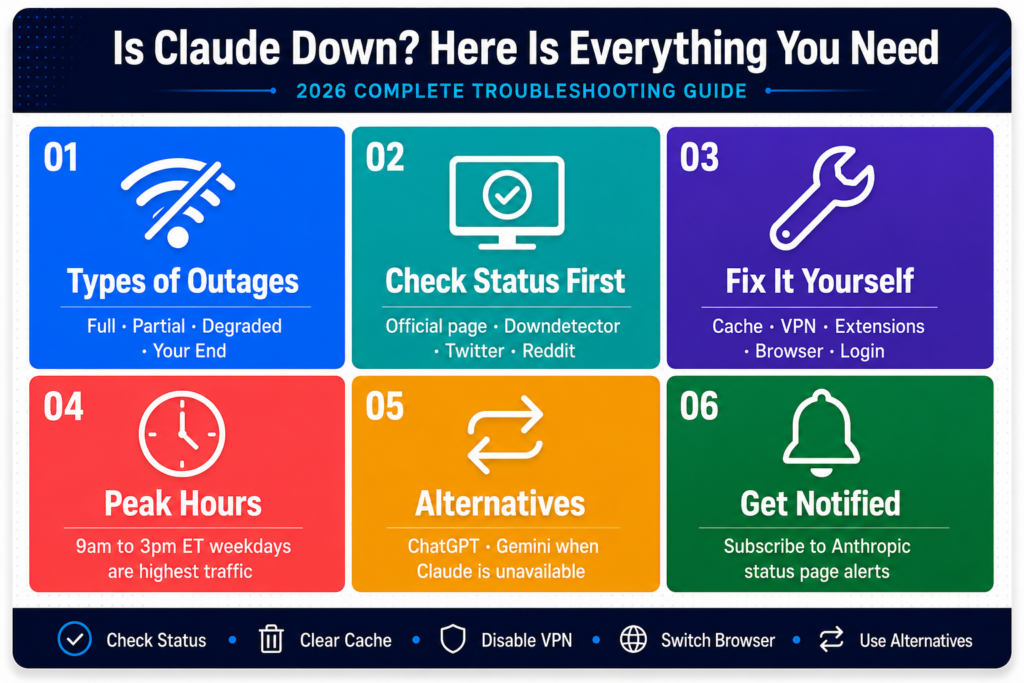
Peak US business hours from roughly 9am to 3pm Eastern time Monday through Friday are consistently the highest-traffic window of the week. This is when millions of professionals are using Claude simultaneously for work tasks and error rates are measurably higher while response times are measurably slower. If you have any flexibility in when you do your Claude-dependent work, operating outside these windows — early morning, evening, or weekends — produces noticeably better and more consistent performance.
Monday mornings are the single highest-traffic period of the entire week without exception. The combination of everyone returning from the weekend and launching into work simultaneously creates a peak that causes performance degradation regularly. If Claude seems unusually slow or unresponsive on a Monday morning, that pattern is well-established and waiting it out is genuinely the fastest practical solution.
Right after Anthropic makes a major product announcement or releases a significant new feature, traffic spikes sharply as large numbers of curious users simultaneously try the new capability. If you notice Claude struggling in the hours immediately following an Anthropic announcement, the timing is almost certainly not a coincidence.
What to Use When Claude Is Genuinely Down
If Claude is confirmed down and you have work that cannot wait, here are your realistic practical options.
For general writing assistance, research, summarization, brainstorming, and conversational tasks, ChatGPT from OpenAI and Gemini from Google are the two most capable widely available alternatives. Neither is a perfect Claude substitute — they have genuinely different strengths, different personalities, and different approaches to responses — but for getting through an urgent deadline while Claude is unavailable they both perform well enough to be useful.
For developers and teams using the Claude API, check the API status page separately from the consumer product status since the two sometimes have different availability during partial outages. If you are building production applications on top of Claude, seriously consider implementing fallback logic that automatically switches to an alternative model when Claude’s API error rate exceeds a threshold you define. This is a standard reliability practice for any business-critical AI integration.
For Claude Pro subscribers experiencing a prolonged confirmed outage, document the issue thoroughly with screenshots of error messages and timestamps showing the duration of the problem, then contact Anthropic support. Anthropic has a track record of providing service credits to Pro subscribers who experience significant confirmed outages and report them properly.
Fixing Claude on Mobile Specifically
Mobile users encounter a distinct set of Claude issues that deserve their own section because the fixes are different from desktop troubleshooting.
Force close the app completely and reopen it. Not minimize it to the background — fully close it from your phone’s app switcher so the process terminates entirely. This clears the app’s runtime memory and active state and resolves many mobile-specific glitches that persist through normal use and simple minimizing.
Clear the app’s cache through your phone’s system settings rather than deleting and reinstalling the app. On both iOS and Android you can clear an app’s cached data without removing the app itself or losing your account information. This resolves corrupted cache issues that cause the app to behave erratically without requiring you to set everything up again from scratch.
Check whether your app is up to date. Anthropic releases regular app updates that fix bugs and maintain compatibility with changes to Claude’s backend infrastructure. Running an outdated version is a surprisingly common cause of mobile Claude problems that present as service issues but are actually compatibility gaps between an old app version and current server behavior.
If you are on mobile data rather than WiFi and experiencing timeouts or incomplete responses, try switching to a WiFi connection for comparison. Claude streams its responses and spotty mobile data — particularly on congested networks or in areas with weak signal — causes streaming delivery failures more readily than most other apps because of the sustained connection requirement.
How to Get Notified When Claude Goes Down in the Futur
Rather than discovering outages by accident mid-task, set up proactive notifications so you find out the moment something changes.
Subscribe to Anthropic’s status page email notifications directly from the status page itself. You will receive email alerts when new incidents are opened, when updates are posted during active incidents, and when incidents are resolved and service returns to normal. This is the most direct and reliable notification channel available since it comes straight from the source.
Follow Anthropic’s official social media accounts for public communications about significant service disruptions. Major incidents that affect large numbers of users typically receive acknowledgment through official channels in addition to status page updates.
Set up a Google Alert for the terms “Claude outage” and “Claude down” to surface news articles and community discussions about significant incidents — more useful for understanding what happened after the fact than for real-time notification, but helpful context when you want to understand the cause and duration of a past disruption.
Conclusion
Claude going down — or appearing to go down — at the wrong moment is genuinely frustrating, particularly when you are in the middle of something important and time-sensitive. But the reality is that most experiences people describe as “Claude is down” are either fixable within a few minutes on their own end or are temporary capacity issues that resolve naturally without any intervention required.
The approach that works consistently is methodical rather than frantic. Check the official status page first to establish immediately whether Anthropic is aware of an active problem. If Claude appears operational, work through the standard fixes — cache, extensions, VPN, browser, connection, session — in that order. Use the downtime productively if a genuine confirmed outage is in progress. And set up status notifications now so the next time this happens you find out immediately rather than discovering it mid-task.
Claude is one of the most reliable AI services available in 2026 and full outages are genuinely uncommon. The majority of “Claude is down” experiences that users report turn out to be browser cache corruption, VPN interference, extension conflicts, or temporary capacity crunches during predictable peak traffic windows — all of which are entirely solvable once you know where to look and what to do.
Bookmark the status page, keep your browser and app updated, and the next time Claude stops responding you will know exactly what to do and in what order to do it.
Frequently Asked Questions
Is Claude down right now? Check Anthropic’s official status page for a live real-time answer. Cross-reference with Downdetector and recent Twitter posts filtered by most recent for crowd-sourced confirmation from other users experiencing the same issue.
Why is Claude not responding to my messages? The most common causes are high server traffic, browser cache issues, VPN interference, or browser extension conflicts. Check the status page first to rule out a service incident, then work through the browser-side fixes before concluding Claude itself is the problem.
Is Claude down for everyone or just me? Open an incognito window in a different browser and try Claude without logging in. If it works there but not in your normal browser the issue is specific to your setup. If it fails in a completely fresh environment too, check the status page for a confirmed service incident.
How long do Claude outages typically last? Minor capacity issues and degraded performance incidents typically resolve within thirty to ninety minutes. Significant infrastructure outages are rare but can last a few hours in serious cases. Anthropic posts regular updates throughout any active incident on their status page.
What is the best alternative to use when Claude is down? ChatGPT from OpenAI and Gemini from Google are the most capable and widely available general-purpose alternatives for writing, research, and conversational tasks while Claude is unavailable.
Does Claude go down more at certain times of day? Yes. Peak US business hours from 9am to 3pm Eastern Monday through Friday and Monday mornings specifically see the highest traffic volume and most frequent performance degradation. Working outside these windows produces noticeably more reliable performance.
Will Anthropic give me a refund or credit if Claude Pro is down? Anthropic has historically provided service credits to Pro subscribers for significant confirmed outages. Contact Anthropic support with screenshots and timestamps documenting the duration of your access issue to request consideration.
Why does Claude keep timing out on longer responses? Usually a combination of high server load and the sustained connection requirement for response streaming. Try shortening your prompts, breaking complex requests into smaller pieces, checking your internet connection stability, and attempting during off-peak hours for best results.













Leave a Reply