

5G Internet Explained: Routers, Towers, Home Plans
I still remember the exact moment someone first told me 5G was going to change everything. We were sitting at a diner, he was going on about download speeds and latency like it was the second coming, and I nodded along while secretly thinking — yeah, I’ve heard this before. Every new G promises the world. Then I drove home, tried to load a YouTube video while my roommate was on a Zoom call, and we both buffered into oblivion.
That was a few years ago. I was wrong to be skeptical. Not about the hype — a lot of that was still hype — but about the underlying technology. Because in 2026, 5G has quietly stopped being a promise and started being actual infrastructure that real people use every day. It’s in your phone, possibly in your home, maybe in your office, and if you look up at the right street corner, it’s on a tower above your head right now.
But here’s what nobody explains properly: 5G isn’t one single thing. It’s a whole ecosystem — routers, laptops, towers, home internet plans, business packages — and the version of 5G you’re getting matters enormously. So let’s walk through all of it, plainly and honestly, from what the technology actually does to whether you should cancel your cable subscription today.
What 5G Actually Is — And Why It’s More Than Just Faster Phone Internet
Most people think of 5G as “faster 4G.” That’s technically true but it misses the bigger picture by a wide margin.
5G is the fifth generation of mobile network technology. The three things it improves over 4G are speed, latency, and capacity. Speed — obviously — means data moves faster. Latency means the delay between sending and receiving a signal shrinks dramatically, from around 30 to 50 milliseconds on 4G down to under 10 milliseconds on 5G. Capacity means a single tower can handle far more simultaneous connections without slowing down for everyone.
In everyday terms: pages load nearly instantly, video calls stop dropping, and your smart home doesn’t choke when twelve devices are all trying to talk to the internet at once.
But zoom out further and 5G starts to look less like a phone upgrade and more like foundational infrastructure for the next decade. Autonomous vehicles need low-latency connections to make split-second decisions. Remote surgery requires near-zero delay between a surgeon’s movement and a robot’s response. Smart city systems — traffic management, energy grids, public safety networks — all require the kind of dense, reliable connectivity that 5G provides and 4G simply can’t.
Telecom companies didn’t spend hundreds of billions building out 5G towers just so your Instagram Stories load faster. They did it because 5G is the backbone of everything that comes next. The consumer benefits are real and immediate, but they’re also just the surface layer of something much larger.
Real-World 5G Internet Speeds: What to Actually Expect
Let’s talk numbers — but honest numbers, not the ones on a carrier billboard.
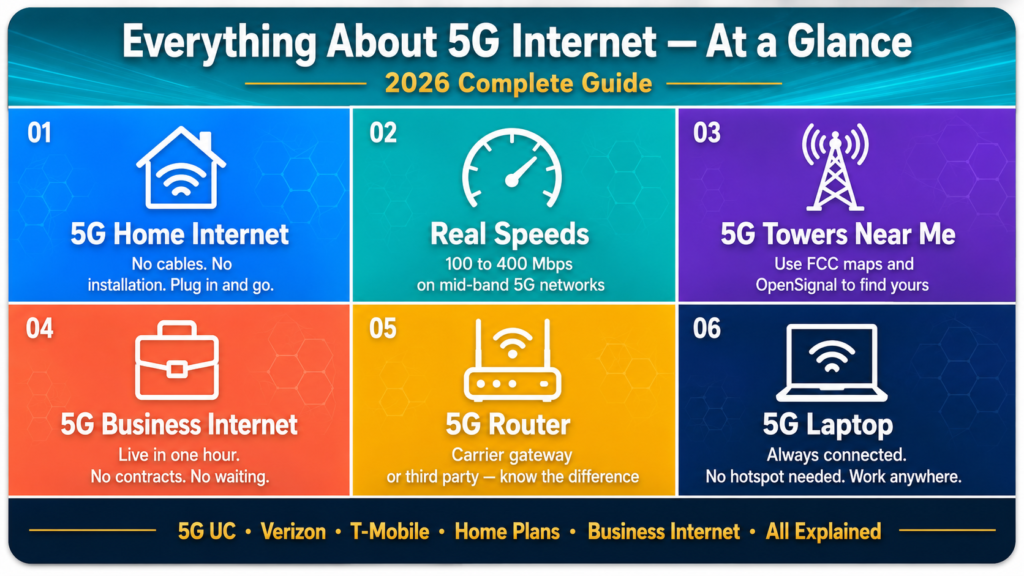
In perfect conditions, right next to a high-band mmWave tower in a dense city, 5G speeds can theoretically hit 1 gigabit per second or beyond. That’s the headline figure carriers love. In the real world, most people on mid-band 5G — which is what the majority of suburban and increasingly rural users are accessing — see download speeds somewhere between 100 and 400 megabits per second. That’s still a dramatic jump from 4G LTE’s typical 20 to 50 megabits per second, and for the way most households actually use the internet, it’s more than enough.
Upload speeds matter too, especially now that so many people work from home. 4G upload was often genuinely painful — sometimes as low as 5 or 10 megabits per second. Mid-band 5G regularly delivers 20 to 100 megabits per second upload, which is the difference between a video call that looks like a hostage situation and one that actually looks professional.
Latency is the underrated upgrade. Sub-10 millisecond response times don’t change your web browsing experience noticeably, but they make online gaming feel responsive in a way that 4G couldn’t match, and they make real-time collaboration tools — shared video editing, live document work, remote desktop access — feel genuinely fluid instead of slightly laggy.
5G Home Internet: Can You Actually Ditch Your Cable Company?
This is the question I get asked most often, and the answer in 2026 is a cautious but increasingly confident yes — depending on where you live.
5G home internet replaces the physical cable or fiber line running into your house with a wireless connection from a nearby 5G tower. A gateway device — essentially a combined modem and router — sits in your home, pulls that wireless signal in, and distributes it to all your devices over WiFi exactly the way a traditional router would. From your laptop or TV’s perspective, nothing is different. You’re just on the internet.
The practical appeal is obvious. No installation appointment. No technician visit window where they say “sometime between 8am and 6pm.” No digging up your yard or threading cables through walls. The device arrives in a box, you plug it in, and you have broadband-speed internet within minutes. For anyone who has spent an afternoon waiting for a cable guy who never showed up, this feels like a minor miracle.
5G Home Internet Verizon: The Premium Urban Option
Verizon has been the most aggressive carrier when it comes to 5G home internet, particularly in urban markets, and their product has matured considerably since the early rollout days.
Their service runs on a combination of mmWave Ultra Wideband in the densest urban areas and mid-band C-band spectrum for broader suburban coverage. Urban customers in well-covered areas regularly report speeds above 300 megabits per second, and in mmWave hotspots some users see 600 to 900 megabits per second — numbers that make most cable plans look slow. Suburban users on C-band typically land in the 100 to 250 megabits per second range, which is still perfectly solid for a household of four.
Pricing sits between $25 and $50 per month depending on your Verizon mobile plan. There are no data caps, which is a genuine differentiator from traditional cable plans that quietly throttle your connection once you’ve burned through a monthly threshold you didn’t know existed.
The hardware — Verizon’s home internet gateway — comes included with the plan. No upfront cost, no equipment rental fees. That removes a barrier that catches people off guard with traditional broadband.
The honest limitation is coverage. Verizon’s mmWave network, while fast, covers specific urban areas and sometimes specific blocks rather than broad regions. Their C-band coverage is wider but still has gaps. Check your exact address on their coverage map, and if possible ask a neighbor who’s already on it what their experience has actually been like day to day.
5G Home Internet T-Mobile: The Wider Net
T-Mobile took a fundamentally different approach to 5G home internet and it’s worth understanding why that appeals to a different kind of customer.
Where Verizon went deep into urban markets first, T-Mobile went wide. They built out their mid-band 2.5GHz coverage across a much broader geography, including suburban areas and semi-rural towns that cable companies have historically underserved or simply ignored. The result is that T-Mobile 5G home internet is available at a significantly higher percentage of US addresses than Verizon’s equivalent product.
Plans start around $50 per month, with discounts for existing T-Mobile mobile customers that can bring it down to $35 per month in some cases. No data caps. The gateway device is straightforward to set up — most households are online within fifteen minutes of opening the box.
Speeds in well-covered areas typically fall between 100 and 300 megabits per second. That’s not touching Verizon’s urban mmWave ceiling, but for the vast majority of everyday household usage — streaming on multiple screens, video calls, gaming, smart home devices — it’s more than sufficient.
The detail that sets T-Mobile apart is their 15-day trial period. You can actually test whether the service works at your specific address before you commit to anything. If the speeds aren’t there or reliability is inconsistent, you return it within 15 days and owe nothing. That’s a genuinely low-risk way to find out whether 5G home internet makes sense for your household.
5G Home Internet Plans: The Full Landscape in 2026
Beyond Verizon and T-Mobile, the 5G home internet space has expanded considerably. AT&T now offers their own fixed wireless access product using their 5G infrastructure, coverage is still expanding but it’s worth checking if you’re in a market where AT&T has strong penetration. Regional carriers and smaller MVNOs have also entered the space, particularly targeting rural markets that the big three haven’t fully reached yet.
The decision framework is simple. First, check which carriers have genuine 5G coverage at your specific address — not your zip code, your actual street address. Second, find real customer feedback from your neighborhood rather than relying on advertised speeds, which are always best-case figures. Third, check contract terms — most 5G home internet products are month-to-month, which is a significant advantage over traditional cable packages that lock you in for a year or two. Fourth, if a trial period exists, use it without hesitation.
5G Business Internet: Serious Infrastructure for Small Businesses
The business use case for 5G internet has gone from interesting experiment to genuine operational tool over the last two years, and the offerings available in 2026 are substantially more mature than the early versions.
For small and medium businesses, the appeal mirrors the home internet case but with higher stakes. A retail location, small office, or pop-up operation can have business-grade connectivity operational within an hour of receiving the hardware. Compare that to the weeks-long process of getting a fiber line installed in a commercial space, and the value proposition becomes obvious quickly.
Verizon Business, T-Mobile for Business, and AT&T Business all offer dedicated commercial 5G internet packages. The key differences from consumer plans are service level agreements that guarantee minimum uptime, dedicated business customer support, and in some tiers, prioritized network access during peak congestion hours so your business traffic doesn’t get deprioritized behind residential users.
The failover use case is particularly compelling. Many businesses use 5G business internet as a backup connection that activates automatically if their primary fiber or cable line goes down. The cost of having a business offline for an hour — missed sales, disrupted communications, payment system failures — typically far exceeds the monthly cost of a backup 5G connection. For any business where internet downtime has a direct revenue impact, this is worth seriously considering.
The honest limitation is the same as the home case: coverage and speeds vary by location, and bandwidth-heavy operations like continuous video production or large cloud backups work better with 5G as a supplement to fiber rather than a replacement.
Finding 5G Towers Near Me: Why It Matters More Than You Think
If you’re considering 5G home internet or trying to understand inconsistent signal strength, knowing where 5G towers are near your location is practical information, not just trivia.
Carrier coverage maps are the starting point. Verizon, T-Mobile, and AT&T all publish interactive maps broken down by network type, including 5G. They tend to be optimistic about fringe coverage areas, but they’re still the most accurate single source for each carrier’s own network.
The FCC Broadband Map provides a carrier-independent picture of broadband availability by address and has improved considerably in accuracy over the past couple of years. It’s a good cross-reference.
For ground-truth data, OpenSignal and Ookla’s 5G Map aggregate real measurements from actual users. These crowd-sourced tools often reveal the gap between what a carrier claims their coverage looks like and what users actually experience on a Wednesday morning. If you’re choosing between carriers for home internet, spending twenty minutes on these tools before deciding is genuinely worthwhile.
One practical tip that doesn’t get mentioned enough: for 5G home internet, the placement of your gateway device inside your house matters. If you’re on the edge of coverage or there are obstructions between you and the nearest tower, placing the device near a window that faces the direction of that tower can make a meaningful difference to your speeds and connection stability.
How 5G Towers Actually Work
Most people drive past these towers every day without thinking about the technology inside them. Here’s a quick, plain-English explanation.
A 5G tower is a base station that transmits and receives radio signals on 5G frequency bands. The key technical difference from 4G towers is a technology called Massive MIMO — multiple input, multiple output — which uses arrays of dozens or even hundreds of small antennas working together. These antennas can direct signals precisely toward individual users through a technique called beamforming, rather than broadcasting in all directions equally. This is why 5G can serve far more simultaneous users without the performance degradation you’d experience on a crowded 4G network.
5G operates across three frequency ranges. Low-band, below 1GHz, travels long distances and penetrates buildings easily but delivers speeds only modestly faster than 4G. Mid-band, between 1 and 6GHz, is the sweet spot — decent range, solid speeds, reasonable building penetration. High-band mmWave delivers extraordinary speeds but has very limited range and struggles with physical obstructions. The towers going up in most suburban and rural areas right now are mid-band deployments, typically adding 5G radios to existing cell tower infrastructure rather than building from scratch.
5G Routers: What to Buy and What to Skip
Whether you’re setting up 5G home internet or need portable connectivity for work, the router question matters.
Carrier-provided gateways — the ones that come with Verizon and T-Mobile home internet plans — are competent, simple, and free with your plan. They handle the basics well and the vast majority of households never need anything more. The limitation is that they don’t offer the advanced networking features that larger homes or tech-savvy users might want.
Third-party 5G routers from Netgear, Asus, and TP-Link fill that gap. Better range, more sophisticated traffic management, proper parental controls, VPN server functionality, and more granular control over your network. Worth the investment if you have a large home, a lot of connected devices, or specific needs that a basic gateway doesn’t address.
Portable 5G routers occupy a different category entirely — they’re essentially sophisticated mobile hotspots that connect to 5G and create a local WiFi network for multiple devices. Genuinely useful for remote workers, field teams, events, or anyone who needs reliable connectivity across multiple locations.
When buying any 5G router, the key things to verify are: which 5G frequency bands it supports and whether those match your carrier’s local deployment, WiFi 6 or 6E support for fast local distribution, and how many simultaneous devices it can handle without degrading performance.
5G Laptops: Worth the Premium or Unnecessary Expense?
Built-in 5G in laptops has become a real product category, and whether it makes sense depends entirely on how you work.
A 5G laptop has a cellular modem built directly into the hardware, connecting to 5G networks the same way your phone does. No hotspot device, no tethering, no hunting for WiFi in a coffee shop or airport. You open the lid and you’re online. For people who travel constantly for work or regularly work in locations without reliable WiFi, this is a genuinely useful feature that simplifies the logistics of staying connected.
The cost premium is typically $100 to $300 over an equivalent WiFi-only model, plus you need a data plan — either a dedicated laptop SIM or using your phone plan’s hotspot allocation. Battery impact from the 5G modem is real but considerably less significant than it was in earlier iterations.
For people who already carry a portable 5G router or tether to their phone regularly, a 5G laptop is probably redundant. For those who want a single clean device that’s always connected without managing extra hardware, it earns its price.
What 5G UC Means on Your Phone
If “5G UC” has appeared on your status bar and you’ve been wondering what it means, here’s the short answer.
5G UC stands for Ultra Capacity and it’s T-Mobile’s label for their mid-band and mmWave 5G — the faster tier of their network. Seeing it means you’re connected to meaningfully quicker spectrum than basic low-band 5G, with speeds typically ranging from 200 to 400 megabits per second or higher in good conditions. Verizon uses “5G UW” for Ultra Wideband. AT&T uses “5G+.” Different names, same concept — you’re on the faster layer of that carrier’s network.
If you never see these labels, you’re likely only accessing low-band 5G, which is a modest improvement over 4G rather than the transformative upgrade mid-band delivers.
Quick Note for the Cooking Searchers: 5g to oz and 5g to Teaspoon
A lot of people land on 5G articles when they’re actually looking for a cooking measurement conversion. If that’s you — 5 grams equals approximately 0.176 ounces, just under a fifth of an ounce. For teaspoons: roughly 1 teaspoon for water, just under 1 for salt, about 1.2 for sugar, and around 1.6 for flour. A kitchen scale set to grams is always more accurate than volume conversions for baking.
Is 5G Safe to Live Near?
The short answer is yes, based on the current scientific consensus.
5G signals are non-ionizing radiation, meaning they don’t carry enough energy to break chemical bonds or damage DNA. This is fundamentally different from ionizing radiation like X-rays, which are genuinely harmful in sufficient doses. The World Health Organization, the International Commission on Non-Ionizing Radiation Protection, and national health agencies across the US, EU, and UK have all reviewed the existing research and found no established health risk from 5G infrastructure operating within regulatory limits. The towers in your neighborhood are regulated and monitored. The science, as it currently stands, doesn’t support the health concerns that circulated heavily during early 5G rollout.
Conclusion: The Bottom Line on 5G in 2026
5G is no longer something that’s coming. It’s already here, already working, and already changing how millions of people connect to the internet every day.
5G home internet through Verizon and T-Mobile is a genuine broadband alternative for a growing number of households. 5G business internet gives small businesses flexibility and reliability that traditional installations can’t match for speed of deployment. 5G routers and laptops give professionals the freedom to work from wherever without babysitting a hotspot. And 5G towers are multiplying across cities, suburbs, and rural areas at a pace that’s quietly closing coverage gaps that have frustrated users since the technology launched.
None of this means 5G is perfect everywhere. Coverage gaps exist. Low-band 5G is not the same thing as mid-band 5G UC, and the difference matters. No carrier’s coverage map gives you the full picture of what you’ll actually experience at your specific address.
The practical approach is straightforward. Check real coverage at your actual address. Use trial periods before committing. Ask people in your neighborhood what their real experience has been. Match the technology to what you actually need rather than what sounds impressive on paper.
5G in 2026 is infrastructure, not a sales pitch. Whether it’s right for you right now depends on where you live and what you need. The tools to find that answer honestly are all available — use them before you make any decisions.
Frequently Asked Questions About 5G
What is the difference between 5G and 5G UC? Standard 5G on your status bar usually means low-band 5G — decent coverage, modest speed improvement over 4G. 5G UC means you’re on T-Mobile’s faster mid-band or mmWave network, with typical speeds of 200 to 400 megabits per second. Verizon’s equivalent is 5G UW. AT&T uses 5G+. All three labels mean the same thing: you’re on the faster, higher-capacity layer of that carrier’s network.
Is 5G home internet reliable enough to replace cable? For most everyday household usage — streaming, working from home, gaming, video calls — yes. Speeds can vary slightly based on network traffic and tower distance, unlike fiber which is more consistent. For the vast majority of households that difference is negligible. If you’re running a server or doing continuous heavy uploads, fiber is still the more stable choice.
How do I find 5G towers near me? Start with your carrier’s coverage map using your exact address. Cross-reference with the FCC Broadband Map for an independent view. For real-world performance data, OpenSignal and Ookla’s 5G Map show crowd-sourced speeds from actual users in your area — often more accurate than what carriers self-report.
What should I look for when buying a 5G router? Confirm it supports the specific 5G frequency bands your carrier uses in your area. Look for WiFi 6 or WiFi 6E support for fast local distribution. Check device capacity if you have a large smart home setup. Carrier gateways cover most households adequately. Third-party options from Netgear, Asus, or TP-Link are worth it if you need advanced features or have a large space to cover.
Is 5G home internet available in rural areas? Increasingly yes, primarily through T-Mobile which prioritized geographic breadth over peak urban speeds. Coverage in rural areas is still expanding and varies considerably by location. Enter your specific address into T-Mobile and Verizon’s coverage maps, and check the FCC Broadband Map for a fuller picture.
How does 5G business internet differ from home internet? The underlying network technology is the same but business packages include service level agreements, dedicated commercial support, and in some tiers prioritized network access during congestion. Built for commercial reliability requirements rather than residential convenience.
Does a 5G laptop need its own data plan? Yes. The built-in modem needs an active SIM and data plan. You can get a dedicated laptop plan from your carrier or use your existing phone plan’s hotspot allocation. Many carriers offer multi-device plans that add a connected laptop for a modest monthly fee, which is usually the most cost-effective approach.
How much does 5G home internet cost? T-Mobile starts around $50 per month, dropping to roughly $35 for existing mobile customers. Verizon ranges from $25 to $50 depending on your mobile plan bundle. Neither has data caps. Factor the full monthly cost into your comparison against your current cable bill.
Is 5G safe to live near? Yes, according to current scientific consensus. 5G signals are non-ionizing radiation and operate well within safety limits set by international regulatory bodies. Major health organizations worldwide have reviewed the research and found no established health risk from properly regulated 5G infrastructure.
How do I convert 5g to oz or 5g to teaspoon? 5 grams equals approximately 0.176 ounces. In teaspoons: about 1 for water, just under 1 for salt, 1.2 for sugar, 1.6 for flour. Density varies by ingredient so a kitchen scale is always more accurate for baking than volume conversions.
When will 5G coverage improve in my area? All three major carriers have committed to ongoing mid-band expansion through 2026 and beyond. T-Mobile has been the most aggressive in suburban and rural deployment. Check carrier maps every few months and look at local community forums where residents share real signal experiences in your specific neighborhood.










Leave a Reply